 Novare
Keep patient and staff data out of AI tools.
Staff are using ChatGPT, Microsoft Copilot and Gemini to draft letters and summarise notes. AI Protect is a browser extension that checks what they paste, type or upload, and stops identifiable details before they are sent.
- Runs on the device
- Stores no patient data
- Deploys through Intune
Coming soon to the Chrome Web Store and Microsoft Edge Add-ons. Want it sooner? Get started now and we'll set your team up directly. IT teams can deploy it now through Intune or Group Policy.
- a name
- a date of birth
- an NHS number
AI tools have created a new way for confidential information to leave your organisation.
Staff are already using them
Usually with good intentions: tidying a letter, summarising a referral, drafting a care plan. Pasting the real notes is the quickest way to do it.
Health data needs the most protection
Health information is special category data under UK GDPR. Once it is entered into an unapproved AI tool, your organisation no longer controls where it is stored or how it is used.
A policy can't stop a paste
Training fades and busy shifts lead to mistakes. AI Protect applies your policy at the point the data would leave, rather than relying on staff remembering it.
It runs in Edge and Chrome and only checks AI tools.
Staff can keep using the AI tools your organisation allows. Writing a letter in Word or an email in Outlook works as normal.
Reminder
When someone opens an AI tool, they're reminded of the rules and asked who they're working with today. Any names they enter are blocked for the session, then forgotten.
Checking
Text is checked when it is pasted, typed or sent. Word, Excel and PowerPoint files are opened and checked before upload.
Removing details
Identifiers are highlighted and can be replaced with labels such as [NAME 1] or [NHS NUMBER], so the AI can still help.
Audit log
Each event is logged with the site and the type of detail found. The text itself is never recorded.
See what would be caught.
Edit the fictional case note below or paste your own example. This uses the same checker as the extension and runs in your browser. Nothing you type is sent anywhere.
Built around UK health and care records.
| Detail | How it is found |
|---|---|
| NHS, CHI and H&C numbers | Ten-digit numbers that pass the Modulus 11 check, or any number labelled as one |
| Names | Titles, labels such as “Patient:” or “son”, first name and surname pairs, your organisation's lists, and names entered for the session |
| Dates of birth | Dates labelled as a date of birth. Strict mode flags every date |
| Addresses and postcodes | UK street addresses and full postcodes |
| Phone numbers and email addresses | UK mobile and landline numbers, and any email address |
| Hospital and record numbers | Labelled IDs from systems such as EMIS, SystmOne, RiO and PAS |
| National Insurance numbers | HMRC format rules |
| Staff registration numbers | NMC PINs, and labelled GMC, HCPC and Social Work England numbers |
| Ages over 89 | Rare enough to identify a person |
| Your own terms | Ward and service names, and local ID formats you add |
| Files | Word, Excel, PowerPoint and text files are checked. Staff must confirm PDFs and images before uploading them |
Built to stand up to a DPIA.
A tool that protects data should not create a new data risk of its own.
- Nothing is sent off the device
- All checks run in the browser. No external service reads staff's text.
- The audit log holds no patient data
- It records the site, the action and the type of detail, such as “NHS number ×1”. It can be exported as CSV.
- Managed centrally
- Force-install it on Edge and Chrome through Intune or Group Policy, then set and lock the configuration: name lists, ward names, file rules, and whether staff can override a block.
- Works alongside Microsoft Purview
- It covers web-based AI, including Copilot in Office on the web. For Copilot in the desktop apps, we provide matching Purview DLP guidance.
- Unapproved AI tools can be blocked
- Choose which AI sites staff can use. Other sites show a short explanation instead.
- Evidence for DSPT and DPIA work
- It gives you a technical control behind your AI policy, and fits the Caldicott Principles.
Health and care organisations of any size.
NHS trusts, GP practices and primary care networks, care homes, home care providers, local authority social care teams, hospices, learning disability and mental health services, and health and care charities.
AI Protect was designed by a practising healthcare professional who works within a multidisciplinary team.
A few minutes per computer.
No IT team needed. Once you've subscribed, your site code is waiting in the manager dashboard. If you'd rather not do it yourself, we'll set it up with you over a short remote call.
See the set-up steps
Download and unzip
Download AI Protect and extract it to a folder such as
C:\AI Protect.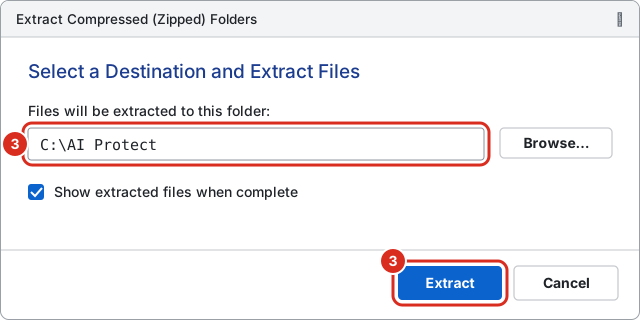
Add it to Edge or Chrome
Open
edge://extensions, turn on Developer mode, click Load unpacked and choose the folder. Chrome works the same way atchrome://extensions.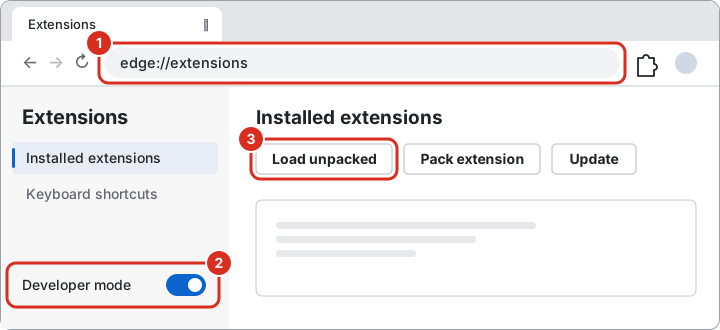
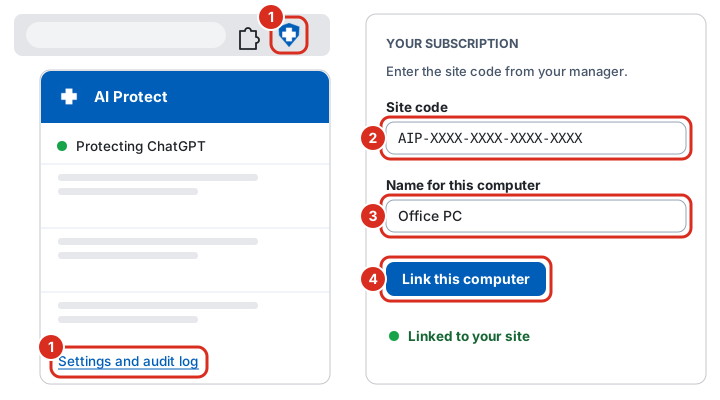
Link the computer to your site
Click the shield icon, then Settings and audit log. Type your site code and a name for the computer, such as Office PC, and click Link this computer.
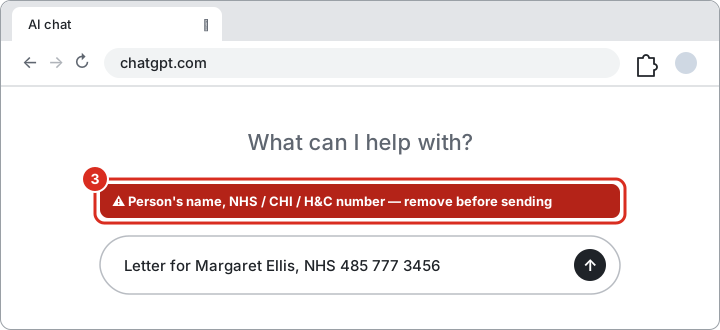
Check it's working
Open Copilot or ChatGPT and type a made-up example with a name and NHS number. A red warning appears and the message is stopped before it's sent.
Each subscriber gets a full printable guide. Store listings for Edge and Chrome are coming soon, which will make step 2 a single click.
Common questions
Does it guarantee that nothing identifiable is ever shared?
No, and no tool can honestly claim that. It reliably catches structured identifiers such as NHS numbers. It catches names through patterns, your organisation's lists and the names staff enter at the start of a session. It should sit alongside your AI policy and staff training, not replace them.
Does any of our data leave the computer?
No. The checks run in the browser. Names entered at the start of a session are held in memory only, never saved to disk, and cleared automatically.
What about Copilot in the desktop Word, Outlook and Teams apps?
Browser extensions can't see inside desktop applications. AI Protect covers Copilot on the web, Microsoft 365 Copilot Chat and Copilot in Office on the web. For the desktop apps, we provide a matching Microsoft Purview DLP configuration.
Can staff turn it off?
Not when it is deployed through Intune or Group Policy. Your IT team can force-install it and lock its settings.
Will it get in the way of normal work?
Only AI tools are checked. In Word, Outlook and Teams, only text sent to the Copilot pane is checked.
Which browsers are supported?
Microsoft Edge and Google Chrome, on Windows and macOS. Listings on the Chrome Web Store and Microsoft Edge Add-ons are coming soon. Until then, we set customers up directly, or your IT team can deploy it through Intune or Group Policy.
Get started for £80 a month
£80 a month for each site, such as one care home, GP practice or team base, for all the staff who work there. It includes help with set-up, a configuration for your organisation and the manager dashboard.
Groups with several sites and NHS trusts: tell us below and we'll send a quote.